How to Successfully Implement a Learning Management System for RTOs
Published by Nimbu8 min read

In This Article
- 1. Phase 1: Prepare Before You Migrate (Week 0–1)
- 1.1. Audit your current systems and data
- 1.2. Identify your implementation team
- 1.3. Organise student, course and compliance information
- 1.4. Confirm your migration scope
- 2. Phase 2: Migrate and Configure Your LMS (Week 1–2)
- 2.1. Migrate the right data
- 2.2. Configure your organisation settings
- 2.3. Set up your first course
- 3. Phase 3: Train Your Team (Week 2–3)
- 3.1. Train administrators first
- 3.2. Train your trainers
- 3.3. Support content creation with AI
- 4. Phase 4: Launch Your LMS and Support Adoption (Week 3–4)
- 4.1. Deliver your first classes
- 4.2. Gather trainer feedback
- 4.3. Introduce students to the platform
- 5. Phase 5: Optimise and Improve (Month 2 Onwards)
- 5.1. Monitor platform adoption
- 5.2. Refine everyday workflows
- 5.3. Prepare for your first AVETMISS submission
- 6. A Successful LMS Implementation Delivers Long-Term Value
- 7. Frequently Asked Questions
Implementing a learning management system for RTOs is more than installing new software. It’s a structured process that involves preparing your data, configuring the platform, training your team, and helping students transition to a new way of learning.
When implemented correctly, a new LMS can streamline operations, strengthen RTO compliance, reduce administrative workload, and improve the learning experience for everyone involved.
A successful implementation can be broken into five practical phases:
- Prepare your data and processes
- Migrate and configure the platform
- Train administrators, trainers, and content editors
- Launch the platform and support adoption
- Optimise workflows after go-live
Here’s how each phase works.
Phase 1: Prepare Before You Migrate (Week 0–1)
The success of an LMS implementation is determined long before any data is transferred. Taking time to review your existing systems helps eliminate outdated information and ensures your new platform starts with clean, accurate data.
Audit your current systems and data
Begin by reviewing:
- Student records
- Active and archived courses
- Learning resources
- Assessment materials
- User accounts
- Reporting processes
- Compliance documentation
Many RTOs discover duplicate files, outdated assessments, or inactive student records during this review. Removing unnecessary data before migration reduces complexity and creates a cleaner LMS environment.
Identify your implementation team
An LMS affects every part of an RTO, so implementation should involve representatives from across the organisation.
This typically includes:
- Compliance Managers
- Administrators
- Trainers
- Content Editors
- Business Owners or Managers
Involving these stakeholders early helps ensure the platform supports the way your organisation already works while identifying opportunities to improve existing processes.

Organise student, course and compliance information
Migration is also an opportunity to review your course structure and compliance documentation.
Prepare items such as:
- Student enrolments
- Learning resources
- Assessment tools
- Pre-Training Reviews (PTRs)
- Pre-Course Material (PCM)
- Qualification structures
- Learning Journey pathways
Starting with organised information makes it easier to maintain ongoing RTO compliance after implementation.
Confirm your migration scope
Before migration begins, work with your implementation team to decide exactly what should move into the new system.
Typical migration items include:
- Student profiles
- Enrolment data
- Courses and units
- Learning materials
- Assessment resources
- Historical student records
Archived courses, duplicate files, and obsolete resources usually don’t need to be migrated. Defining the scope early helps avoid delays and keeps the project on schedule.
Phase 2: Migrate and Configure Your LMS (Week 1–2)

Once planning is complete, it’s time to configure your new LMS and transfer the information you’ll need.
Migrate the right data
Data migration is more than copying files from one system to another.
A successful migration ensures that student records, course content, assessments, and supporting documents are transferred accurately while maintaining the integrity of your training records.
Depending on your organisation, this may include:
- Student enrolments
- Course structures
- Units of competency
- Assessment resources
- Learning materials
- Historical student evidence
Migrating only relevant information keeps your new system organised from day one.
Configure your organisation settings
Next, customise the platform to reflect your RTO’s processes.
This includes configuring:
- Organisation branding
- User roles and permissions
- Notifications
- Learning Journey settings
- Assessment workflows
- Reporting preferences
These settings ensure trainers, administrators, and students each have access to the tools relevant to their role.
Set up your first course
Rather than launching every qualification immediately, many RTOs begin with a pilot course.
This allows your team to test:
- Learning Journey
- Assessments
- Practical Observations
- Self-Marking Quizzes
- Student enrolments
- Trainer workflows
Running a pilot helps identify improvements before expanding the rollout across the organisation.
Phase 3: Train Your Team (Week 2–3)

Even the best platform won’t deliver results if staff aren’t confident using it.
Providing structured onboarding before launch helps reduce uncertainty and encourages consistent adoption across your organisation.
Train administrators first
Administrators should learn how to manage the platform, including:
- Student management
- Organisation settings
- Reporting
- User permissions
- Class management
- AVETMISS reporting
A solid understanding of these functions helps ensure day-to-day operations run smoothly from launch.
Train your trainers
Once administrators are comfortable with the platform, trainers can focus on the tools they’ll use most often.
Key features include:
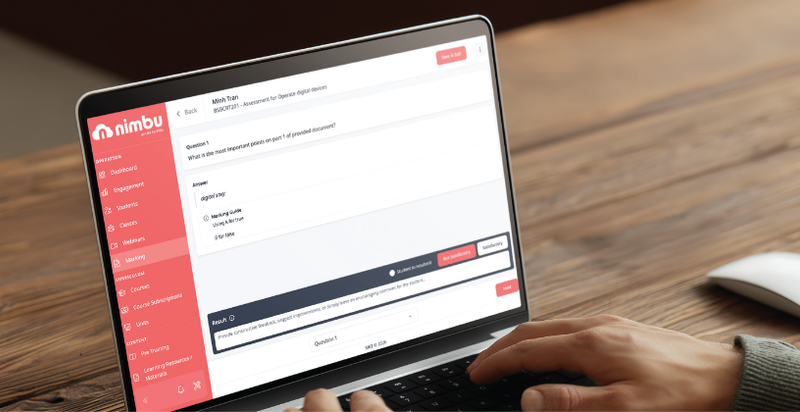
- Marking Dashboard
- Learning Progress Summary
- Practical Observations
- Assessment management
- Student communication
Hands-on training allows trainers to become familiar with their workflows before students begin using the platform.
Support content creation with AI
Developing learning resources can be one of the most time-consuming tasks for content editors.
Nimbu’s Michi AI Assistant helps content editors create:
- Assessments
- Quizzes
- Learning materials
- Training articles
- Pre-Training Reviews (PTRs)
It can also brainstorm new ideas, generate content from uploaded documents or website URLs, and apply AI-generated content directly into courses. This reduces repetitive work while helping teams build quality learning materials more efficiently.
Phase 4: Launch Your LMS and Support Adoption (Week 3–4)
Launching your LMS is the beginning of the implementation journey—not the end.
The first few weeks are critical for helping trainers and students build confidence with the new platform.
Deliver your first classes
Start with a small group of students and monitor how they interact with the platform.
Track areas such as:
- Assessment submissions
- Student participation
- Trainer workflows
- Support requests
A phased rollout allows you to refine processes before introducing additional courses.
Gather trainer feedback
Regular feedback sessions help identify any questions or workflow improvements early. Making small adjustments during the first few weeks often leads to stronger long-term adoption.
Introduce students to the platform
Provide students with guidance on:
- Accessing their courses
- Navigating Microsites
- Completing assessments
- Tracking their progress
Students can also use Michi Tutor Assistant, which provides instant AI-powered support by answering course-related questions whenever they need assistance. Whether they’re revising before an assessment or studying after hours, students can continue progressing without waiting for trainer availability.
Phase 5: Optimise and Improve (Month 2 Onwards)
Implementation doesn’t end once the platform goes live. The most successful RTOs continue refining their processes as staff become more familiar with the system.
Monitor platform adoption
Review how staff and students are using the platform by tracking:
- Student engagement
- Assessment completion
- Trainer activity
- Course participation
These insights help identify where additional support or process improvements may be needed.
Refine everyday workflows
As your organisation becomes more familiar with the LMS, look for opportunities to streamline:
- Assessment processes
- Learning Journey design
- Student communication
- Reporting workflows
Small improvements made over time can significantly reduce administration and improve efficiency.
Prepare for your first AVETMISS submission
One of the biggest milestones after implementation is preparing your first AVETMISS reporting submission.
Because student records, assessments, and enrolment information have been captured consistently throughout the implementation process, generating compliant reports becomes far more straightforward than managing multiple disconnected systems.
A Successful LMS Implementation Delivers Long-Term Value
Implementing a learning management system for RTOs isn’t just about replacing software. It’s about creating a stronger operational foundation for your organisation.
By following a structured implementation plan, Australian RTOs can minimise disruption, improve staff confidence, strengthen compliance processes, and create better learning experiences for students.
With purpose-built features such as Learning Journey, Marking Dashboard, Practical Observations, AVETMISS reporting, Michi AI Assistant, and Michi Tutor Assistant, Nimbu helps make every stage of implementation simpler—from planning and migration through to long-term optimisation.
Frequently Asked Questions
How long does it take to implement a learning management system for RTOs?
Implementation time depends on the size of your RTO, the amount of data being migrated, and the complexity of your courses. Following a structured implementation plan helps reduce delays and keeps the transition organised.
What data should be migrated to a new LMS?
Most RTOs migrate active student records, enrolments, courses, learning resources, assessments, and essential historical student information. Archived or outdated content is often excluded to keep the new system organised.
Why is staff training important during LMS implementation?
Training helps administrators, trainers, and content editors understand how to use the platform confidently. This improves adoption, reduces support requests, and ensures the LMS becomes part of everyday workflows.
How does Nimbu support RTO implementation?
Nimbu provides guided onboarding, implementation assistance, a comprehensive Knowledge Base, product demonstrations, and ongoing customer support to help Australian RTOs transition successfully.
Can Nimbu support classroom, workplace, and online training?
Yes. Nimbu supports face-to-face, workplace-based, blended, and online delivery through features such as Learning Journey, Microsites, Self-Marking Quizzes, Practical Observations, and mobile-friendly learning experiences.

Start Your 30 Day FREE Trial Today!
Obligation free, no contracts, unlimited access, get started in less than a minute!
- Free training and onboarding
- 30 Days free trial
- No contracts
- Obligation free
- Unlimited use of Nimbu and all the features